
Passwords will continue to be leaked and cracked - why not stop using them?
- Introduction
- The Problem with Passwords
- The Passwordless Approach
- How It Works
- Architecture Overview
- Terraform Setup
- Spring Boot Integration
- Benefits
- Conclusion
- Resources
Introduction#
Password management remains one of the weakest point in many systems. Static credentials are still:
- Hardcoded in application configs
- Stored insecurely in CI/CD pipelines
- Never rotated
- Shared between environments and team members
These patterns introduce serious risk, and relying solely on secret management tools without addressing the core issue — the use of long-lived secrets — simply isn’t enough.
This blog documents a fully passwordless PostgreSQL setup using Hashicorp Vault for dynamic credentials generation, integrated with a Spring Boot application.
The Problem with Passwords#
Embedding static credentials in code or configurations makes any system vulnerable. No matter how securely a password is stored, once it exist in a static form, it’s just a matter of time before it leaks or becomes outdated.
Common issues with traditional credentials include:
| Problem | Risk |
|---|---|
| Hardcoded secrets | Accidental leaks via git or logs |
| Shared accounts | No visibility or traceability |
| Manual rotation | Rarely performed, easy to forget |
| Persistent access | Compromise = indefinite access |
The root problem is static credentials. The solution is to move towards ephemeral, dynamic credentials that are tightly scoped, short-lived, and automatically revoked.
The Passwordless Approach#
Instead of storing passwords, an application can request temporary access to a database directly from Vault. Vault handles the creation, expiration, and revocation of database users in real time.
Vault becomes the only entity that knows the PostgresSQL admin password. All other users are short-lived, automatically generated, and tied to tightly scoped roles.
This approach significantly reduces the blast of radius of any credential leak. Even if credentials are accidentally exposed, their short TTL (1 minute) makes them effectively useless by the time they could be misused.
How It Works#
Here’s the high-level flow:
- The Spring Boot application authenticates to Vault using AppRole.
⚠️ AppRole is not the most secure option for production, but it’s suitable for demo purposes.
- It requests a dynamic credential from Vault.
- Vault creates a temporary PostgreSQL Role with specific privileges.
- The application connects to the database using this role.
- Before the lease expires, the application request a new credential.
- Vault revokes expired roles and automaticlly remove them.
Architecture Overview#
┌─────────────────┐    ┌──────────────────────┐    ┌─────────────────┐
│   Spring Boot   │───▶│  HashiCorp Vault     │───▶│   PostgreSQL    │
│   Application   │    │  (Dynamic Secrets)   │    │   Database      │
└─────────────────┘ └──────────────────────┘ └─────────────────┘- Spring Boot Application: Uses the Vault client to request and rotate database credentials
- Hashicorp Vault: Manages access, generates credentials, and revokes expired ones.
- PostgreSQL Database: Accept only temporary, Vault-issued users with limited TTL.
Terraform Setup#
🔐 Secrets Engine Configuration
resource "vault_mount" "database" {
  path = "database"
  type = "database"

  description = "PostgreSQL dynamic database credentials"
}

resource "vault_database_secret_backend_connection" "postgres" {
  backend       = vault_mount.database.path
  name          = "postgres-connection"
  allowed_roles = ["postgres-role"]

  postgresql {
    connection_url = "postgresql://{{username}}:{{password}}@${var.postgres_host}:${var.postgres_port}/${var.postgres_database}?sslmode=disable"
    username       = var.postgres_admin_username
    password       = var.postgres_admin_password
  }

  verify_connection = true
}

resource "vault_database_secret_backend_role" "postgres_role" {
  backend = vault_mount.database.path
  name    = "postgres-role"
  db_name = vault_database_secret_backend_connection.postgres.name

  default_ttl = 10
  max_ttl     = 15

  creation_statements = [
    "CREATE ROLE \"{{name}}\" WITH LOGIN PASSWORD '{{password}}' VALID UNTIL '{{expiration}}';",
    "GRANT CONNECT ON DATABASE ${var.postgres_database} TO \"{{name}}\";",
    "GRANT USAGE ON SCHEMA public TO \"{{name}}\";",
    "GRANT SELECT, INSERT, UPDATE, DELETE ON ALL TABLES IN SCHEMA public TO \"{{name}}\";",
    "GRANT USAGE, SELECT ON ALL SEQUENCES IN SCHEMA public TO \"{{name}}\";",
    "GRANT ALL PRIVILEGES ON DATABASE ${var.postgres_database} TO \"{{name}}\";",
    "ALTER DATABASE ${var.postgres_database} OWNER TO \"{{name}}\";"
  ]

  revocation_statements = [
    "DROP ROLE IF EXISTS \"{{name}}\";"
  ]
}

resource "vault_approle_auth_backend_role_secret_id" "postgres_app_secret" {
  backend   = vault_auth_backend.approle.path
  role_name = vault_approle_auth_backend_role.postgres_app.role_name
}
🔑 AppRole Authentication Setup
resource "vault_policy" "postgres_policy" {
  name = "postgres-app-policy"

  policy = <<EOT
path "database/creds/postgres-role" {
  capabilities = ["read"]
}

path "database/config/postgres-connection" {
  capabilities = ["read"]
}
EOT
}

resource "vault_auth_backend" "approle" {
  type = "approle"
  path = "approle"
}

resource "vault_approle_auth_backend_role" "postgres_app" {
  backend   = vault_auth_backend.approle.path
  role_name = "postgres-app"

  token_policies = [vault_policy.postgres_policy.name]
  token_ttl      = 1800
  token_max_ttl  = 7200

  bind_secret_id = true
}
Spring Boot Integration#
The Spring Boot application uses Spring Vault to fetch temporary PostgreSQL credentials from Vault and dynamically build a DataSource.
As the lease of these credentials nears expire, the application automatically fetch a new set and seamlessly switches the database connection.
Here’s a breakdown of each component:
This configuration makes Spring Boot use a custom DataSource implementation instead of a static, single data source.
@Configuration
public class DataSourceConfig {

    @Bean
    @Primary
    public DataSource dataSource(DynamicDataSourceRouter router) {
        return router;
    }
}
A small utility class that can be used to determine the current active datasource.
public class DataSourceContextHolder {
    private static final ThreadLocal<String> contextHolder = new ThreadLocal<>();

    public static String getDataSourceType() {
        return contextHolder.get();
    }
}
This extends the AbstractRoutingDataSource and allows switching between multiple DataSource instances.
Each time new credentials are fetched from Vault, a new HikariCP instance is added with a unique key.
@Component
public class DynamicDataSourceRouter extends AbstractRoutingDataSource {

    @PostConstruct
    public void init() {
        setTargetDataSources(new HashMap<>());
        afterPropertiesSet();
    }

    @Override
    protected Object determineCurrentLookupKey() {
        String key = DataSourceContextHolder.getDataSourceType();
        return key != null ? key : "current";
    }

    public synchronized void addDataSource(String key, javax.sql.DataSource dataSource) {
        Map<Object, Object> dataSources = new HashMap<>(getResolvedDataSources());
        dataSources.put(key, dataSource);

        setTargetDataSources(dataSources);
        afterPropertiesSet();
    }

    public synchronized void removeDataSource(String key) {
        Map<Object, Object> dataSources = new HashMap<>(getResolvedDataSources());
        dataSources.remove(key);

        setTargetDataSources(dataSources);
        afterPropertiesSet();
    }
}
This is the core class that manages the entire lifecycle of Vault-backend dynamic credentials
- Authenticate with Vault via AppRole
- Request new credentials from Vault’s PostgreSQL secrets engine
- Build a new HikariCP DataSource using those credentials
- Test the connection before activating it
- Replace the current datasource at runtime without restarting the app
- Clean up the old datasource safely
@Component
@DependsOn("dynamicDataSourceRouter")
public class DataSourceManager {
private static final Logger log = LoggerFactory.getLogger(DataSourceManager.class);
private final VaultTemplate vaultTemplate;
private final DynamicDataSourceRouter dataSourceRouter;
@Value("${spring.datasource.url}")
private String jdbcUrl;
private volatile String currentDataSourceKey = "current";
private Instant leaseExpiry;
public DataSourceManager(VaultTemplate vaultTemplate, DynamicDataSourceRouter dataSourceRouter) {
this.vaultTemplate = vaultTemplate;
this.dataSourceRouter = dataSourceRouter;
}
@PostConstruct
public void init() {
log.info("🚀 Initializing Vault DataSource Manager");
try {
HikariDataSource initialDataSource = createNewDataSource();
dataSourceRouter.addDataSource(currentDataSourceKey, initialDataSource);
dataSourceRouter.setDefaultTargetDataSource(initialDataSource);
log.info("☑️ Initial DataSource registered with key: {}", currentDataSourceKey);
} catch (Exception e) {
log.error("❌ Failed to initialize DataSource Manager", e);
throw new RuntimeException("DataSource initialization failed", e);
}
}
@Scheduled(initialDelay = 6_000, fixedRate = 2_000)
public void refreshIfNeeded() {
log.info("👀 Is a datasource refresh needed?");
if (isExpiredOrNearExpiry()) {
refreshDataSource();
}
}
private void refreshDataSource() {
log.info("🔄 Starting DataSource refresh...");
synchronized (this) {
HikariDataSource newDataSource = createNewDataSource();
String newKey = "ds-" + System.currentTimeMillis();
dataSourceRouter.addDataSource(newKey, newDataSource);
String oldKey = currentDataSourceKey;
currentDataSourceKey = newKey;
dataSourceRouter.setDefaultTargetDataSource(newDataSource);
log.info("☑️ DataSource refreshed. New key: {}, Old key: {}", newKey, oldKey);
CompletableFuture.delayedExecutor(3, TimeUnit.SECONDS)
.execute(() -> cleanupOldDataSource(oldKey));
}
}
private HikariDataSource createNewDataSource() {
VaultResponse response = vaultTemplate.read("database/creds/postgres-role");
long leaseDuration = response.getLeaseDuration();
this.leaseExpiry = Instant.now().plusSeconds(leaseDuration);
Map<String, Object> credentials = response.getData();
assert credentials != null;
String username = (String) credentials.get("username");
String password = (String) credentials.get("password");
log.info("👨🎨 Creating new DataSource for user: '{}'", username);
HikariDataSource ds = new HikariDataSource();
ds.setJdbcUrl(jdbcUrl);
ds.setUsername(username);
ds.setPassword(password);
ds.setMaximumPoolSize(10);
ds.setMinimumIdle(2);
ds.setConnectionTimeout(30000);
ds.setValidationTimeout(5000);
ds.setConnectionTestQuery("SELECT 1");
try (Connection conn = ds.getConnection()) {
if (conn.isValid(2)) {
log.info("☑️ New DataSource connection test successful {}", ds.hashCode());
}
} catch (SQLException e) {
log.error("❌ New DataSource connection test failed", e);
}
return ds;
}
private void cleanupOldDataSource(String oldKey) {
try {
Map<Object, DataSource> resolvedDataSources = dataSourceRouter.getResolvedDataSources();
if (resolvedDataSources.containsKey(oldKey)) {
DataSource oldDataSource = resolvedDataSources.get(oldKey);
dataSourceRouter.removeDataSource(oldKey);
if (oldDataSource instanceof HikariDataSource hikariDs) {
int activeConnections = hikariDs.getHikariPoolMXBean().getActiveConnections();
int totalConnections = hikariDs.getHikariPoolMXBean().getTotalConnections();
log.info("📊 Closing HikariPool - Active: {}, Total: {}", activeConnections, totalConnections);
hikariDs.close();
log.info("🗑️ Old DataSource properly closed: {}", oldKey);
} else {
log.warn("⚠️ DataSource is not HikariDataSource: {}", oldDataSource.getClass().getSimpleName());
}
} else {
log.warn("⚠️ DataSource not found for cleanup: {}", oldKey);
}
} catch (Exception e) {
log.error("❌ Error cleaning up old DataSource {}: {}", oldKey, e.getMessage(), e);
}
}
private boolean isExpiredOrNearExpiry() {
if (leaseExpiry == null) {
return false;
}
boolean needsRefresh = Instant.now().isAfter(leaseExpiry.minusSeconds(2));
if (needsRefresh) {
log.info("📅 DataSource lease expires at: {}, refreshing now", leaseExpiry);
}
return needsRefresh;
}
}Application in Action
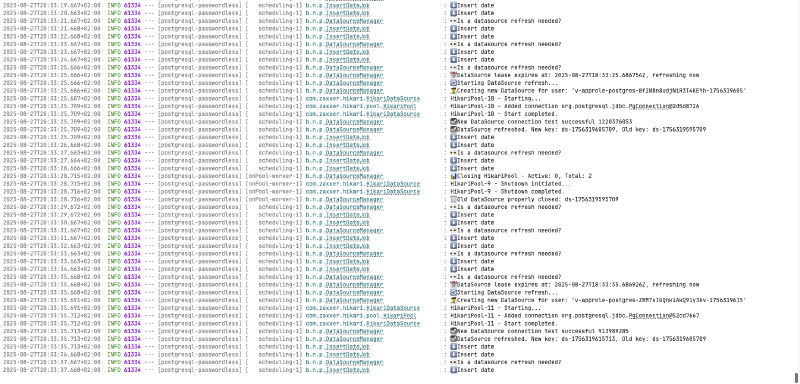
When the application runs, you can see the dynamic credential rotation happening in real-time through the logs:
You can also query PostgreSQL directly to see all the temporary roles that Vault creates and manages:
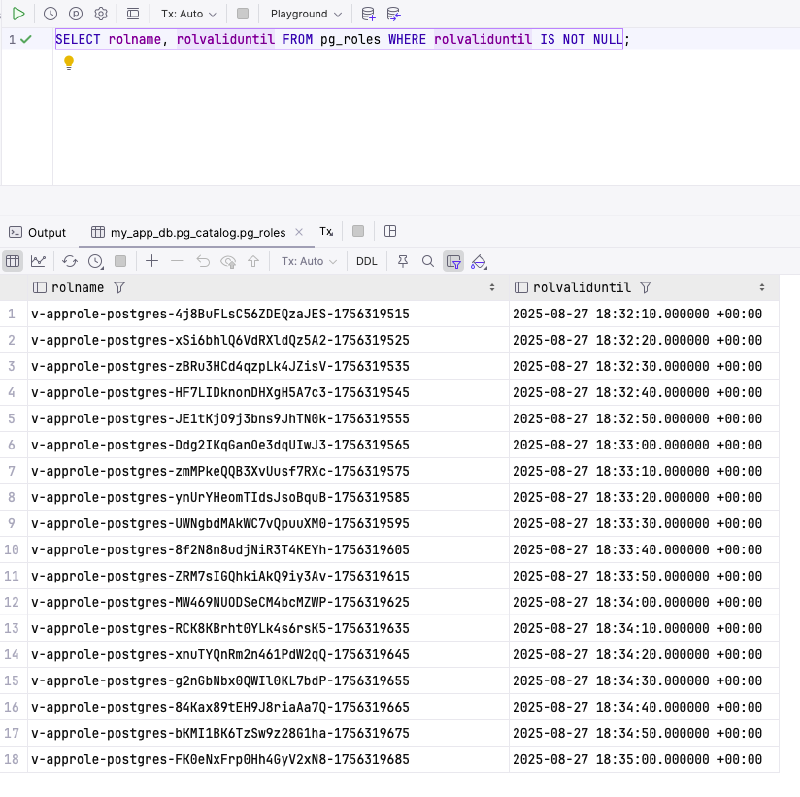
rolvaliduntil timestamp and gets automatically cleaned up by Vault when expired.
Benefits#
🔐 Enhanced Security
- No hardcoded or static credentials
- Automatic rotation with short TTL
- Credentials valid only for a few seconds or minutes
- Easy to audit access via Vault logs
⚙️ Operational
- Centralized access control
- No need to rotate credentials manually
- Expired users are automatically cleaned up
- Compatible with CI/CD, Docker, and cloud-native workflows
🚀 Developer Experience
- Easy to integrate using Spring Vault
- No local secrets required for dev environments
- Fully automated bootstrap for new environments
Conclusion#
Using static database passwords increases the risk of credential leaks and unauthorized access. By implementing dynamic, time-limited database credentials with HashiCorp Vault and integrating them into a Spring Boot application, it’s possible to completely eliminate the need for managing passwords manually.
This approach results in:
- A more secure infrastructure
- Simpler operations
- Less room for human error
It’s not just about better secret management, this is a shift toward ephemeral infrastructure where access is always scoped, logged and controlled.
Resources#
If you’re interested in exploring the implementation details, you can access the code on GitHub.
The repository includes Terraform configurations, complete Spring Boot implementation, Docker Compose setup, and automation script to get you started quickly.